Newton's Laws in Your Smartphone: The Physics You Use Every Day Without Knowing It
A Sec 3 student I know recently told me she didn't see the point of Newton's Laws.
"When am I ever going to use inertia in real life?" she asked, scrolling through Instagram on her phone.
I pointed at the phone in her hand.
"Right now," I said. "You're using all three of Newton's Laws simultaneously. You just don't know it yet."
She didn't believe me. By the end of the conversation, she was genuinely curious about physics for the first time since primary school.
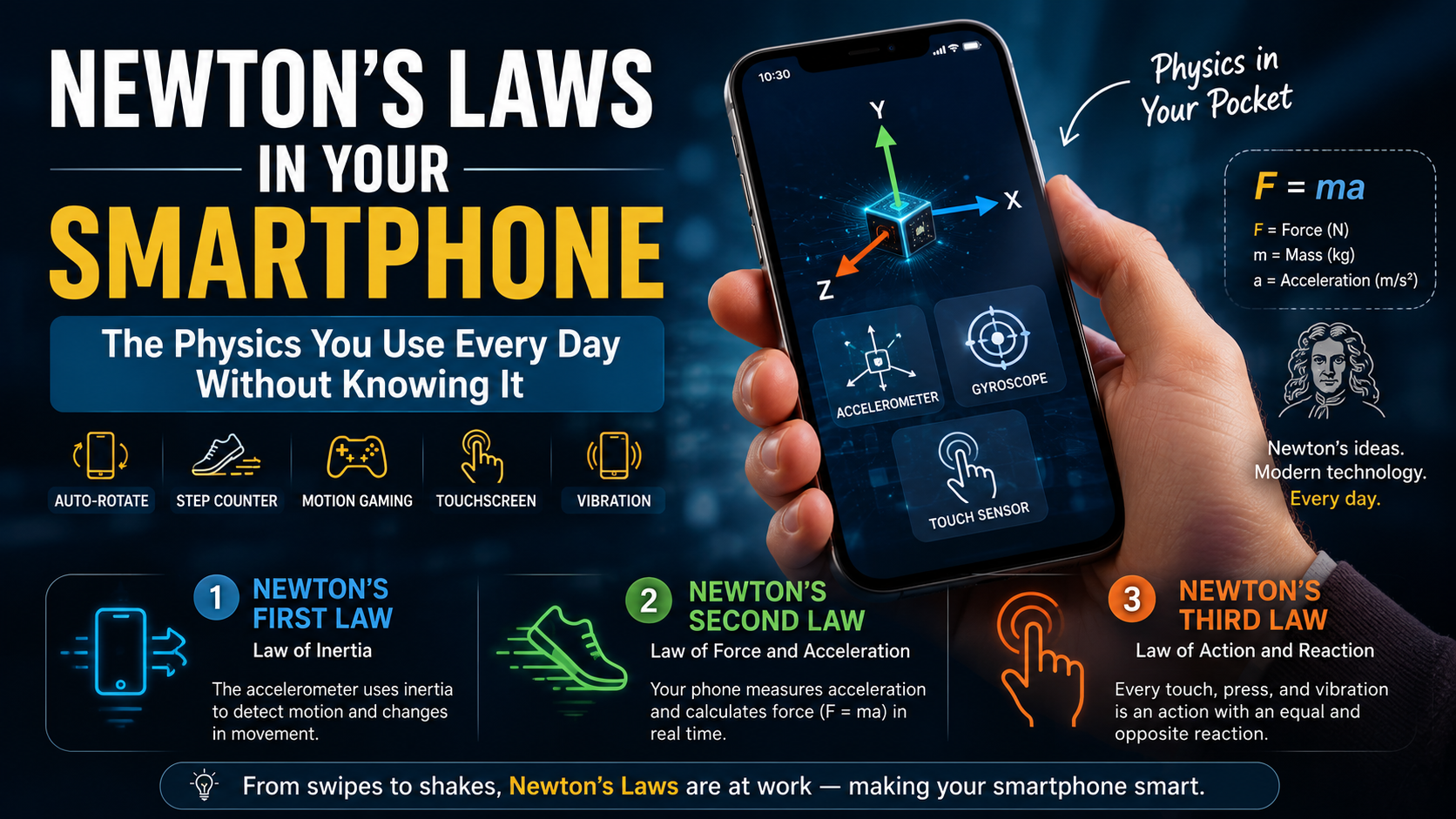
The truth is, Newton's Laws of Motion — inertia, force and acceleration, action and reaction — are built into almost every function of the smartphone in your pocket. The accelerometer, the gyroscope, the touchscreen, even the way your screen auto-rotates when you tilt the phone. All of it runs on classical mechanics that Isaac Newton described in 1687, adapted into silicon and code more than 300 years later.
Here's how it works — and why understanding this changes how you see every mechanics question in your Singapore physics syllabus.
Newton's First Law and the Phone in Your Pocket
Newton's First Law — the law of inertia — states that an object at rest stays at rest, and an object in motion stays in motion, unless acted on by an external force.
Inside your smartphone sits a tiny device called an accelerometer. It's a microelectromechanical sensor — essentially a microscopic mass suspended on springs inside a chip. When your phone is still, the mass is at rest. When you move the phone, the mass resists that movement due to inertia — it "wants" to stay where it was.
The sensor measures how much force is needed to push that tiny mass into motion, and uses that measurement to calculate the phone's acceleration in three directions: up-down, left-right, and forward-backward.
This is Newton's First Law encoded in hardware. The inertia of a tiny suspended mass, measured and converted into data. Every time you shake your phone to shuffle a playlist, unlock a pedometer app, or trigger a gesture control, you're using an accelerometer built entirely around the concept of inertia and resistance to motion change.
For students studying O-Level Physics mechanics or H2 Physics kinematics, this is exactly what inertia means — not an abstract idea from a textbook, but a measurable, engineered property that billions of people rely on every time they unlock their phone.
Newton's Second Law: How Your Phone Measures Force and Acceleration
Newton's Second Law — F = ma — tells us that the net force on an object equals its mass times its acceleration. Change the force, change the acceleration. Change the mass, change how much force you need.
The accelerometer doesn't just detect motion — it quantifies it.
Because the mass inside the sensor is fixed and known, the sensor can calculate the exact force required to produce any measured acceleration. That's F = ma running in real time, inside a chip smaller than your fingernail, dozens of times per second.
Your phone uses this data constantly. When you're gaming and tilt the phone to steer a car, the accelerometer feeds precise acceleration values to the game engine. When you're running with a fitness app open, the phone counts your steps by detecting the rhythmic up-down acceleration pattern of your gait. When your phone screen rotates from portrait to landscape, it's because the accelerometer detected a 90° change in the direction of gravitational acceleration relative to the phone's orientation.
Newton's Second Law isn't just in your physics textbook. It's running in the background of your phone at this exact moment, calculating forces you'll never directly observe.
This is the kind of real-world connection that makes mechanics in A-Level H2 Physics 9749 and 9478 significantly easier to understand — because the concepts are already familiar, just unnamed.
Newton's Third Law: Every Touch Gets a Response
Newton's Third Law — for every action, there is an equal and opposite reaction — appears in your phone in perhaps the most obvious place: the touchscreen itself.
When you press your finger against a phone screen, you exert a force on the glass. Newton's Third Law says the glass exerts an equal and opposite force back on your finger — you can feel this as the firm resistance of the screen. That pair of forces, action and reaction, is how the screen detects not just where you're pressing but how hard.
Modern smartphones use capacitive touchscreens — they detect the electrical charge of your fingertip rather than physical pressure.
But force-sensitive screens (like Apple's Force Touch, now built into many devices) use pressure sensors to distinguish between a light tap and a firm press, unlocking different functions based on the magnitude of the force you apply.
Newton's Third Law is also at work in the phone's vibration motor. When your phone vibrates, a small eccentric mass spins rapidly inside a motor. The spinning mass pushes outward, and by Newton's Third Law, an equal force pushes the phone body in the opposite direction — creating the distinctive buzz you feel in your hand. The frequency, intensity, and pattern of that vibration are all controlled by varying the force applied to the eccentric mass.
The Gyroscope: Angular Momentum Meets Instagram
Your phone's gyroscope uses a more advanced physics concept — angular momentum — but its roots are firmly in Newtonian mechanics.
A gyroscope measures rotation, not just linear acceleration. It contains a vibrating structure (in modern phones, a microelectromechanical resonator) that resists changes to its orientation due to angular momentum conservation. When you rotate the phone, the resistance of that angular momentum is measured and converted into precise rotational data.
This is why your phone camera can stabilise video even when your hands are shaking. The gyroscope detects every tiny unwanted rotation, and the camera system applies a compensating adjustment — in real time, faster than the eye can see. The phone is constantly measuring angular forces and applying Newton's laws to counteract them.
For students studying rotational motion in H2 Physics or torque in the A-Level syllabus, the gyroscope is a perfect real-world model. The physics isn't new — it's Newton's mechanics applied to rotational systems.
How Physics Powers Everything Else in Your Phone
The applications of classical mechanics don't stop at the accelerometer, gyroscope, and touchscreen.

Every row in that table is a physics topic. Every one of them lives inside the device most Singapore students check more than 50 times a day.
Why This Matters for Your Physics Syllabus
When Newton's Laws are taught as abstract principles — objects on frictionless surfaces, blocks on inclined planes, collisions between identical masses — they can feel disconnected from anything real.
But when you understand that F = ma is literally calculating the force inside a sensor in your phone right now, the formula stops being something to memorise and becomes something that describes how the world actually works.
This is exactly why physics coaching in Singapore that starts with real, observable phenomena — rather than equations — builds deeper and more durable understanding.
In O-Level Physics (6091), Newton's Laws appear in the Forces and Dynamics topic, with exam questions asking students to apply F = ma to vehicles, falling objects, and contact forces. Students who can connect these to real devices they use daily find the questions significantly more intuitive.
In H2 Physics (9749 and the new 9478 syllabus), mechanics deepens into momentum, impulse, circular motion, and gravitational fields — all extensions of the same Newtonian framework. The student who genuinely understood inertia through the accelerometer analogy has a much easier time reasoning through conservation of momentum questions than the student who memorised the formula without the concept.
In IB Physics, the Mechanics theme runs across multiple papers and requires students to reason qualitatively and quantitatively about forces, accelerations, and energy. Real-world context — like the physics of a smartphone — gives students the conceptual anchor they need to handle unfamiliar question formats.
Who Benefits Most From This Approach to Physics
Concept-first, real-world physics teaching works especially well for students who:
- Find Newton's Laws abstract and hard to visualise from textbook problems alone
- Do well on familiar question types but struggle when a problem is rephrased or uses an unfamiliar scenario
- Are preparing for the "explain why" and "describe what happens" sections of O-Level or A-Level papers
- Want to build genuine understanding before the Sec 4 or JC2 exam crunch, not just drill formulas
Frequently Asked Questions About Newton's Laws and Real-World Physics
How does an accelerometer in a phone actually measure acceleration?
An accelerometer contains a tiny mass suspended on microscopic springs inside a chip. When the phone accelerates, the mass resists the movement due to inertia (Newton's First Law). The deflection of the springs is measured electronically and converted into an acceleration value using Newton's Second Law (F = ma). The mass and spring constants are known, so force — and therefore acceleration — can be calculated precisely.
What is the difference between an accelerometer and a gyroscope in a smartphone?
An accelerometer measures linear acceleration — movement along straight axes (up-down, left-right, forward-backward). A gyroscope measures rotational motion — how fast and in which direction the phone is rotating. Most phones combine both sensors. The accelerometer handles tilt and motion detection; the gyroscope handles rotation and orientation. Together they give the phone a complete picture of its movement in three-dimensional space.
Is Newton's Third Law really used in a touchscreen?
Yes. When you press your finger on a screen, you apply a force downward. The screen applies an equal and opposite force back on your finger — that's what you feel as the firm resistance. Capacitive touchscreens detect the electrical charge of your fingertip rather than the force directly, but force-sensitive displays (like Apple's Force Touch) use Newton's Third Law directly, measuring the reaction force to determine how hard you're pressing and unlocking different functions accordingly.
How does this relate to what I need to know for O-Level or A-Level physics?
Directly. Newton's First Law (inertia and resistance to motion change) maps to O-Level Forces and Dynamics and A-Level momentum and impulse. Newton's Second Law (F = ma) is the central equation for calculating forces and accelerations across both syllabuses. Newton's Third Law (action-reaction pairs) appears in questions about collisions, rocket propulsion, and contact forces. Understanding the smartphone application of all three makes the textbook problems significantly more intuitive — because you've already seen the physics working in something you use every day.
Does the gyroscope in a phone relate to angular momentum in H2 Physics?
Yes. The gyroscope's operating principle is angular momentum conservation — a rotating or vibrating body resists changes to its rotational orientation. In H2 Physics 9749 and 9478, angular momentum appears in the circular motion and rotational dynamics sections. The gyroscope is one of the cleanest real-world demonstrations of why angular momentum is conserved and what it "feels" like when a system resists rotational change.
Why does my phone screen rotate when I tilt it?
Your phone's accelerometer continuously measures the direction of gravitational acceleration relative to the phone's orientation. Gravity always points downward, so by measuring which axis of the accelerometer is detecting the strongest gravitational pull, the phone calculates whether you're holding it portrait or landscape. When that direction shifts beyond a threshold angle, the operating system rotates the display. It's Newton's Second Law and gravity detection running simultaneously, several times per second.
How can I use everyday examples like this to study physics better?
Start by asking "where does this physics happen in real life?" for every concept you study. Inertia → your phone's accelerometer. Specific heat capacity → why a metal spoon burns your mouth faster than the soup. Pressure → why sharp knives cut and snowshoes don't sink. Connecting each concept to something you can touch or use daily is one of the most effective study strategies in physics — and it's the core approach at MakePhysicsEasy.com.
The Takeaway: The Best Physics Textbook Is Already in Your Pocket
Newton published his laws in 1687. The first iPhone launched in 2007. And yet every core mechanism inside a modern smartphone — the accelerometer, the gyroscope, the haptic motor, the touchscreen — runs on the same three laws Newton described over 300 years ago.
That's not a coincidence. That's what it means for physics to be fundamental.
MakePhysicsEasy.com teaches Newton's Laws, mechanics, and the full Singapore physics syllabus — O-Level (6091), A-Level H2 Physics (9749/9478), and IB Physics — the same way: by starting with something real, building genuine understanding, and only then connecting it to the formula.
Because a student who understands why F = ma is in their phone will never forget how to use it in an exam.
Book a trial lesson at MakePhysicsEasy.com and discover what physics feels like when it makes sense.
Written by Mr. Cornelius Chew, Ex-MOE, NIE-trained physics educator and FIDE-certified chess instructor, MakePhysicsEasy.com — Singapore's concept-first physics coaching centre.